
The Okta/Breezy HR SAML integration currently supports the following features:
For more information on the listed features, visit the Okta Glossary.
Sign into your Breezy HR account.
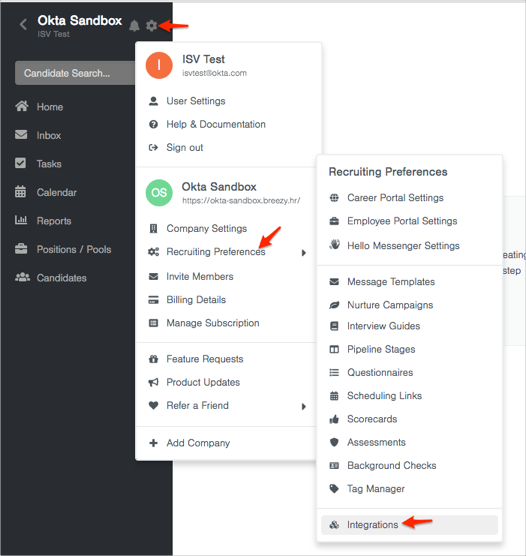
Click on the gear icon, then navigate to Recruiting Preferences > Integrations:
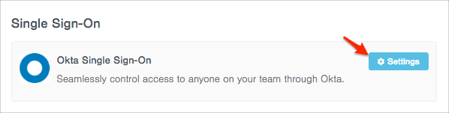
Scroll down to Single Sign-On, then click Settings:
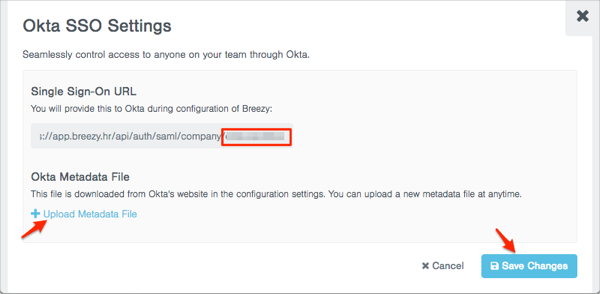
Do the following (see screen shot at end of step for reference):
Make a copy of your Customer ID. This value is the part of the Single Sign-On URL value that we have shown in the red box in the screen shot below).
Okta Metadata File: Download and save, then click Upload Metadata File to upload it to Breezy HR:
Sign into the Okta Admin dashboard to generate this value.
Click Save Changes:
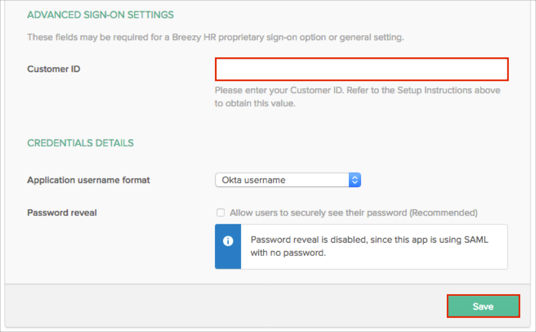
In Okta, select the Sign On tab for the Breezy HR app, then click Edit.
Scroll down to the ADVANCED SIGN-ON SETTINGS section.
Enter the Customer ID value that you made a copy of in step 4 into the corresponding field.
Click Save.
Done!
The following SAML attributes are supported:
| Name | Value |
|---|---|
| FirstName | user.firstName |
| LastName | user.lastName |
| user.email |